Account Creation Date
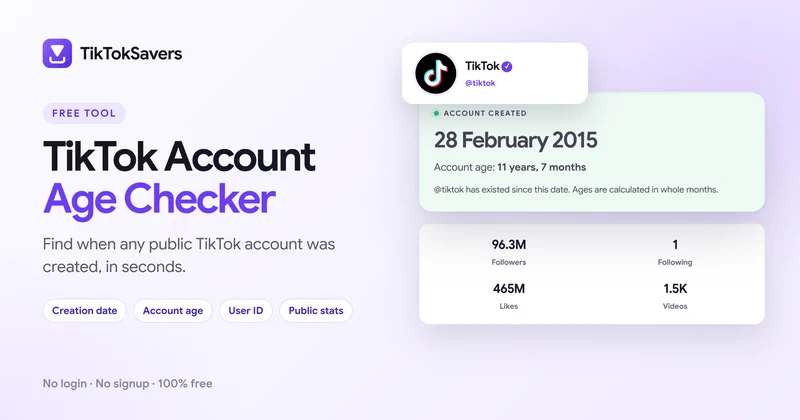
Find out when a public TikTok account was created. Our tool displays the creation date, including the day, month, and year, when reliable information is available.
TikTok account age checker
Check how old any public TikTok account is online for free. Just enter a username to find its creation date, account age in years and months, user ID, followers, likes, and profile details. No login or signup required.
Enter a username, with or without the @ sign.
TikTokSavers is a free online tool that helps you discover when a public TikTok profile was created and how long it has existed. Get the account's join date, numeric user ID (UID), profile information, and public statistics, including followers, following, likes, and videos, all in one place.
Whether you're checking your own profile or exploring another creator's account, simply enter a TikTok username to retrieve available details in seconds. No app installation, password, or registration needed.
You only need a TikTok username to check when a public account was created. Follow these simple steps to find its creation date, account age, and profile details in seconds.
Visit the TikTokSavers Account Age Checker in your browser. The tool works on mobile, desktop, and tablet devices without installing an app.
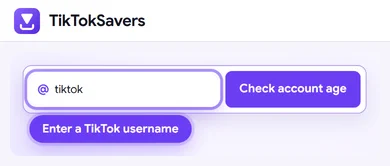
Type the username of the account you want to check, with or without the @ symbol. If you're unsure about a handle, you can use our TikTok username checker to check its availability.
Click "Check account age" to look up the public TikTok profile. TikTokSavers retrieves the available account information automatically.
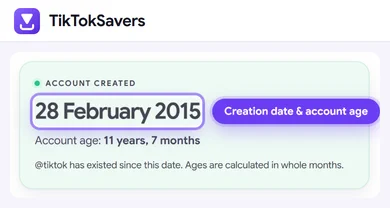
See when the account was created and how old it is in years and months, when reliable creation-date information is available.
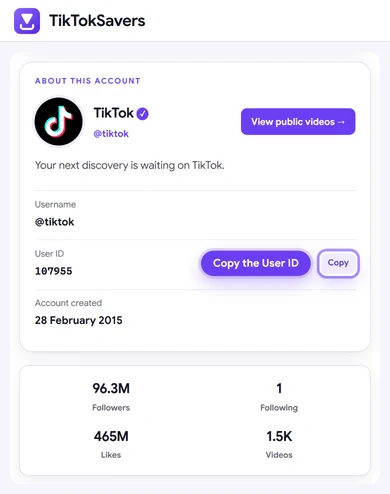
Scroll down to view the account's User ID (UID), bio, followers, following, total likes, and video count. You can also copy the numeric User ID or open the creator's public videos.
The lookup usually takes just a few seconds, depending on account availability and response time. No TikTok login or password is required.
Features
Discover when a TikTok account was created and explore its public profile information. Here are the key features that make our free online age checker simple and useful.
Find out when a public TikTok account was created. Our tool displays the creation date, including the day, month, and year, when reliable information is available.
See exactly how long a TikTok account has existed. TikTokSavers automatically calculates the account's age in years and months from the available creation date.
Check TikTok account age using just a username, with or without the @ symbol. No profile links, passwords, or personal information are required.
View the account's profile picture, display name, username, and biography in one place. Explore available public details without opening multiple pages.
Get available public statistics, including followers, following, total likes, and video count. Understand the account's activity alongside its creation date.
Find the unique numeric User ID associated with a TikTok account. Copy the UID directly from the results without manually searching through profile data.
Check account creation dates on iPhone, Android, Windows PC, Mac, or tablet. Our online tool works directly in your browser without installing any software.
Look up public TikTok accounts without signing into TikTok or sharing your password. Simply enter a username and view the available results.
Check your own account or another public TikTok profile for free. No subscription, premium plan, or payment is required to use the account age checker.
TikTokSavers reads available creation-date information from TikTok's public profile data instead of guessing from the first uploaded video or numeric User ID (UID).
When a reliable timestamp is available, the tool displays the account creation date and age in years and months. If TikTok doesn't provide a usable timestamp, the date is shown as unavailable rather than displaying an inaccurate result.
The account age checker displays profile details and public statistics, not downloadable audio. To save audio from an eligible public video, use our TikTok to MP3 converter by pasting the video's link.
Troubleshooting
Having trouble checking a TikTok account's creation date or profile details? Here are the most common lookup issues on TikTokSavers and how to fix them.
| Problem | Likely Cause | Fix |
|---|---|---|
| Username not found | Incorrect or outdated TikTok username | Check the spelling and use the account's current @username |
| Creation date unavailable | No reliable creation timestamp found | Check the profile details; the date may not be available for that account |
| Account information not loading | Temporary API error or TikTok access restriction | Wait a moment and try again |
| Private or deleted account | Profile information is restricted or unavailable | Check whether the account is publicly accessible on TikTok |
| Incorrect account displayed | Entered a display name instead of a username | Use the exact TikTok @username, not the profile's display name |
| Followers or likes don't match | Public statistics have changed since the lookup | Refresh the results to retrieve the latest available data |
| Too many requests | Temporary rate limit or repeated lookups | Wait a few minutes before checking again |
If the account is accessible but its creation date cannot be verified, TikTokSavers may still display the available public profile details without showing an unsupported date.
No. Changing your TikTok username doesn't reset your account's original creation date. Your numeric User ID also generally remains the same, even after you update your username.
Finding out how old a TikTok account is doesn't have to be complicated. With TikTokSavers, you can check a public account's creation date, age in years and months, numeric User ID, followers, likes, and video statistics using just a username.
Our free online checker works on iPhone, Android, and PC without any login, signup, or app installation. Simply enter a TikTok username, check the available account details, and discover when the profile was created. If a reliable creation date isn't available, the tool lets you know instead of guessing.
Enter your TikTok username into TikTokSavers Account Age Checker and click Check account age. The tool displays your account's creation date and age in years and months when available.
Enter their public TikTok username into our online checker. You can view the available creation date, account age, numeric User ID, and public profile statistics without logging in.
Yes, TikTokSavers is 100% free with no subscription or hidden fees. You can check public TikTok accounts online without downloading an app or creating an account.
Yes. Enter a username to view available profile details, including User ID (UID), bio, followers, following, likes, and video count. A creation date is also shown when reliable information is available.
Some TikTok accounts don't provide reliable creation-date information. Incorrect usernames, private or unavailable profiles, and temporary lookup restrictions can also prevent results.
Yes. You can check any accessible public TikTok profile using its username. No TikTok password, login, or signup is required.
No. Account age tells you how long a TikTok profile has existed, while age verification confirms the account owner's age for TikTok's age-restricted features. Our tool checks account age, not personal age.