1080p HD
Sharper video when a Full HD source is available.
iPhone & iPad downloader
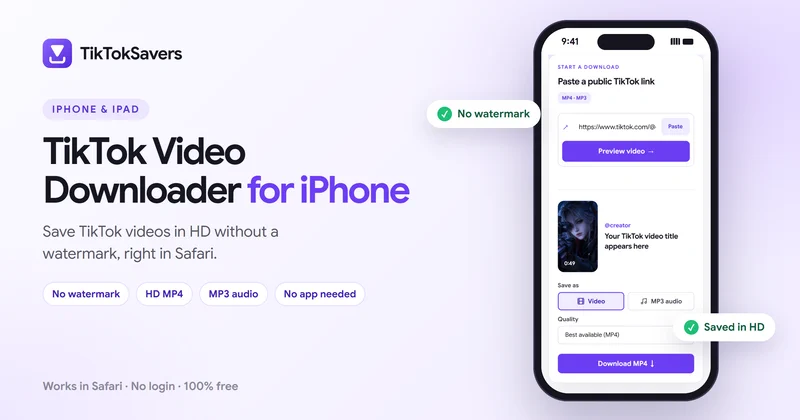
Download TikTok videos on your iPhone or iPad without a watermark using TikTokSavers. You don't need to install an app or create an account. Copy the TikTok video link, paste it into the downloader, choose the available quality, and save the video using Safari.
Start a download
This is a photo post. It has no video, but you can save its sound as an MP3.
TikTokSavers works directly in your iOS browser and lets you download available TikTok videos in MP4 format, including HD options such as 720p or 1080p when available from the source.
Only know the creator's username? Browse their public videos with our TikTok video downloader with username. Need just the sound? Save it as an MP3 with TikTok to MP3.
Step by step
You only need the TikTok video link and Safari. Here's how to save a TikTok video on your iPhone:
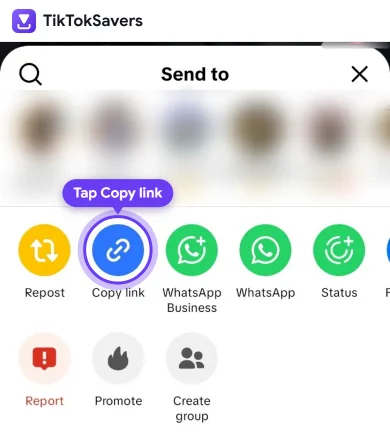
Open the TikTok app and find the video you want to save.
Tap Share → Copy Link to copy the video's URL.
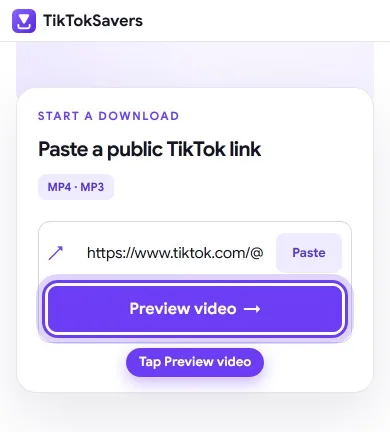
Open Safari on your iPhone and visit TikTokSavers.
Paste the copied TikTok URL into the download box and tap Preview Video. TikTokSavers will check the public video and show the available download formats.
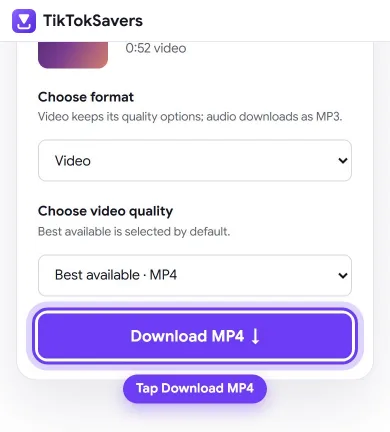
Choose your preferred option, such as 1080p, 720p, 576p, or MP3, depending on what is available for that TikTok.
Tap Download and confirm the download if Safari asks.
You can check the download progress from Safari's Downloads button.
Safari normally saves downloaded files to the Files app first.
Open: Files → Downloads → Your Video
Open the video, tap Share, and select Save Video. The TikTok video will then appear in your Photos app.
Can't find the TikTok you just downloaded? It may be in Files rather than Photos.
Safari usually saves downloaded MP4 files in: Files → Browse → iCloud Drive → Downloads
Your Safari settings can also use On My iPhone → Downloads as the download location.
To change where Safari stores files, open your iPhone's Settings, find Safari → Downloads, and select your preferred location.
A downloaded video does not always appear automatically in your Photos library. Open it from Files and use Share → Save Video when you want a copy in Photos.
You don't need a separate TikTok downloader app on your iPhone.
TikTokSavers is a web-based TikTok downloader, so the process happens through Safari or another supported browser. There is no downloader app to install and no TikTok account login required.
This also means you should never need to provide your TikTok password or verification code just to process a public video link.
Simply use:
TikTokShareCopy LinkSafariTikTokSaversDownload
Video quality
The available download quality depends on the original TikTok video.
TikTokSavers shows the available formats after processing the link. Depending on the source, these can include:
1080p HD
Sharper video when a Full HD source is available.
720p
Good quality with a smaller file size.
576p
Useful when you want to reduce storage or data usage.
MP3
For saving the available audio instead of the video. See TikTok to MP3.
Choosing 1080p does not improve a video that was originally uploaded at a lower resolution. For the best result, choose the highest quality actually available from the source.
TikTokSavers works on iPad in much the same way as on iPhone.
Copy the video's link from TikTok, open TikTokSavers in Safari, paste the URL, and choose your download format.
The downloaded MP4 will normally appear in the Files app. From there, you can watch it offline, move it to another folder, share it, or save it to Photos.
The larger iPad screen can also make it convenient to work with downloaded videos in supported editing or presentation apps. Working on a Mac or Windows computer instead? Follow our guide to download TikTok videos on PC or Mac.
Troubleshooting
Check the Files app → Downloads. Safari may have downloaded the video successfully without adding it to your Photos library.
Open the file, tap Share, and select Save Video.
Make sure the TikTok link was copied completely and try processing it again.
If you opened TikTokSavers inside another app's built-in browser, try opening the page directly in Safari instead.
The video may have been deleted, made private, restricted, or become unavailable.
TikTokSavers processes supported public TikTok content and cannot access private accounts.
You don't need to log in to TikTok to use TikTokSavers.
For a supported public video, the downloader only needs the TikTok video URL. You should never enter your TikTok password, verification code, or other account credentials into a video downloader.
Use downloaded content responsibly and respect the original creator's rights, especially when sharing, editing, or republishing someone else's work.
FAQ
Yes. TikTokSavers works through Safari, so no separate downloader app needs to be installed.
TikTokSavers can provide the available clean video download for supported public TikTok links without adding TikTok's visible watermark to the downloaded file.
Safari commonly saves downloaded videos to the Downloads folder in the Files app. You can then use Share → Save Video to add the MP4 to Photos.
If a 1080p source is available for the TikTok video, you can select the available 1080p option. Available resolution depends on the original video.
Yes. You can use TikTokSavers through Safari on an iPad and follow essentially the same process as on an iPhone.
No. TikTokSavers does not access videos from private TikTok accounts. Use it with supported public content that you have the right to download.